















OOHHH very Tim Burton.. Looking at the hi res you have a slight halo effect on the edges especially in darker areas of the background. Nice work. Reply »
(2 years and 319 days ago)
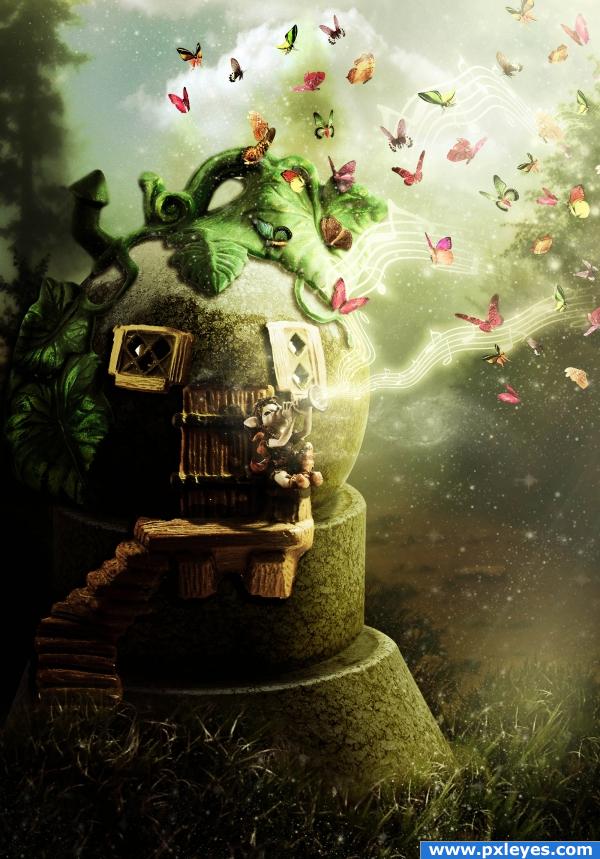
I cut pieces from the porcelain pumpkin image, added them onto the stone ball. Colored and added shadows to every element.
Added dwarf, added shadows for him, added backround and grass, and colored using a couple of adjustment layers.
Added butterflies, galaxies and light beams brushes.
Added gradients to obtain warm color and light.
Credits to:
- "bazzabent stock" on deviantart for a great stock so kindly given to us. I used two images: porcelain pumpkin and dwarf. Visit account at: http://bazzabent-stock.deviantart.com/.
- "shoofly-stock" also on deviantart for a stock that I am absolutely in love with. I used some really great butterflies PNG files. Visit account at: http://shoofly-stock.deviantart.com/.
- "sunira" on deviantart for the galaxies brush that helped me a lot to get just the right feeling I was looking for. At: http://sunira.deviantart.com/.
- "rlBrushes" on deviantart for a wonderful pixie dust brush. Account at: http://rl-brushes.deviantart.com/.
Rest of images are from "stockxchng" as usual and also from obsidiandawn and blendfu.com. Thanks to all these sites for a wonderful job offered to all of us!
SBS posted!
Enjoy! (2 years and 285 days ago)
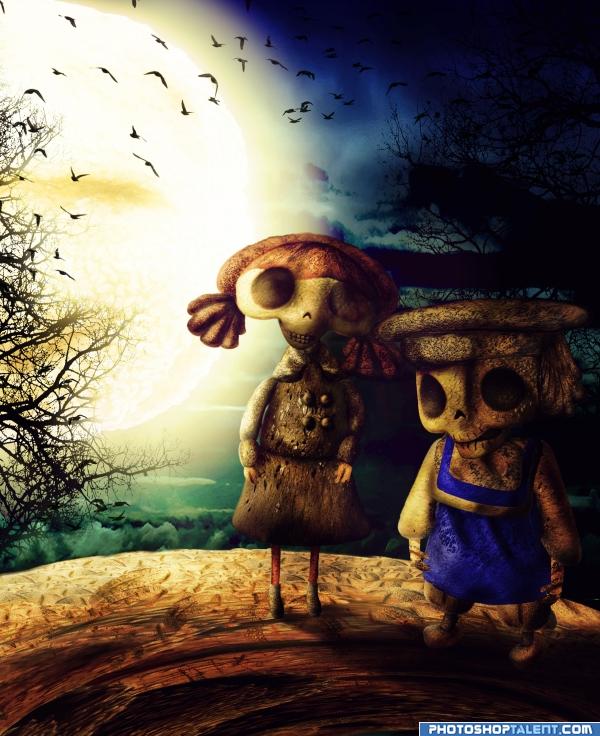
I used parts of the source image to reconstruct the two characters based on the initial dolls image presented as source number 1.
I added shadows/highlights using different grey brushes and I colored some parts of the two characters.
I have created the moon and the land out of the top bread in the source image.
Added the sky in the backround, some trees silhouettes on the sides and birds.
In order to get better coloring I added a lot of different gradient adjustment layers, changed the blending mode to color and played with opacities.
Hope you like it! (2 years and 319 days ago)
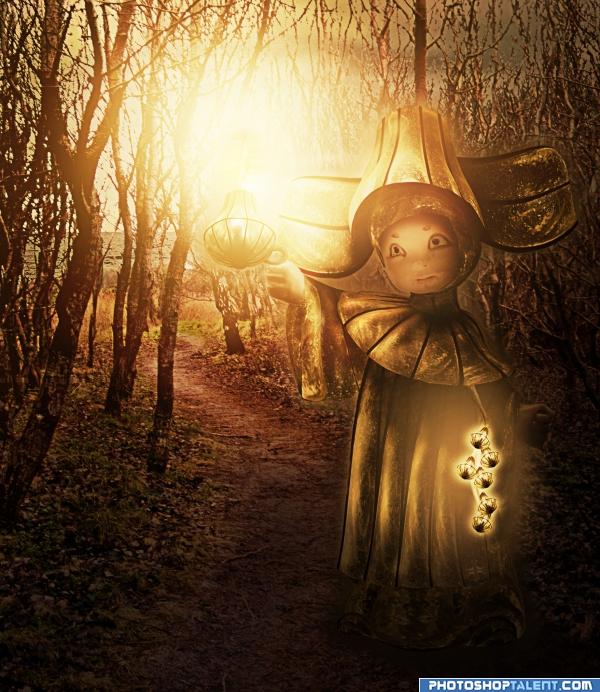
I used a great picture of a porcelain little girl and recreated her by using different selections from image source.
For the backround I have used a forest landscape provided so kindly by Colourize Stock on Deviantart. Please visit author for other great images: http://colourize-stock.deviantart.com/
Hope you like it and you won't find it too cheesy! (2 years and 342 days ago)
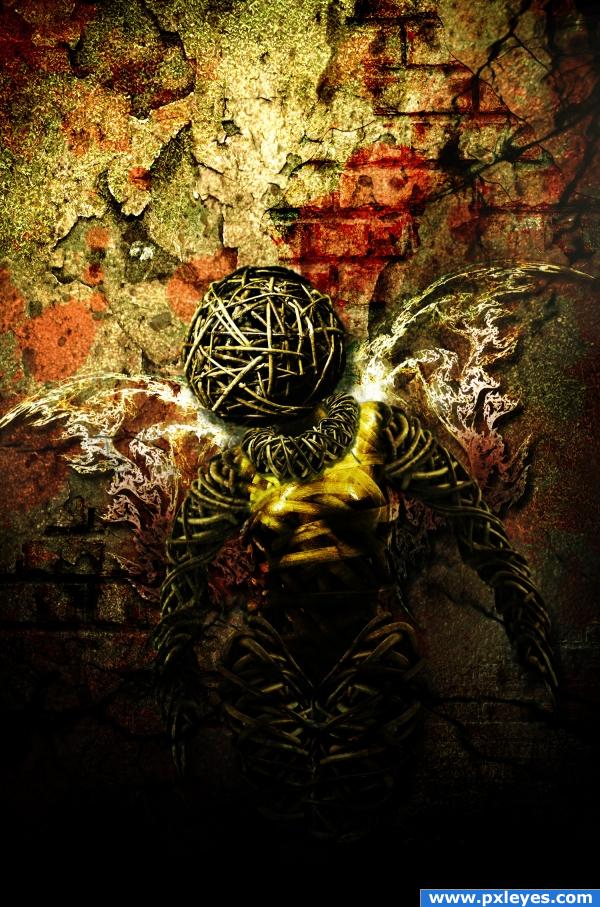
I have thought that for this constest any image could be turned into a grunge style. But I didn't think this should be enough, so I decided to actually create some sort of a creature, something original and then make it look totally grunge.
So....I reconstructed over the woman sculpture using selections from a wooden circlet and ball. I used warp tool to get the shapes I wanted.
I created the backround by adding a lot of grunge sources.
Added wings, shadows, some gradient adjustment layers and corrected some spots by using the clone stamp tool.
Lots of credits to:
- "CSnyder" on deviantart for some really cool grunge textures. Visit account at: http://csnyder.deviantart.com/;
- "Fetishfaerie" also on deviantart for some very good glass grunge packages, at: http://fetishfaerie-stock.deviantart.com/;
- "Markopolio" on deviantart for some great angel wings. At: http://markopolio-stock.deviantart.com/;
- "Night-fate stock" on deviantart for the best grunge image I've ever seen. Please visit author at: http://night-fate-stock.deviantart.com/.
- and last but not least, "Spiritsighs" on deviantart for a really good texture brush which I used to render the blood spots on the backround. Main account for other great brushes at: http://spiritsighs-stock.deviantart.com/.
There are two extra sources used, which, even if they are not too visible...I assure you that they are on the image:
1.. http://fetishfaerie-stock.deviantart.com/art/Frost-Pack-III-33357187 - Frost Texture
2. http://fetishfaerie-stock.deviantart.com/art/Frost-Pack-V-47098236 - Glass Grunge Texture
Hope you like it!
Enjoy! (2 years and 283 days ago)
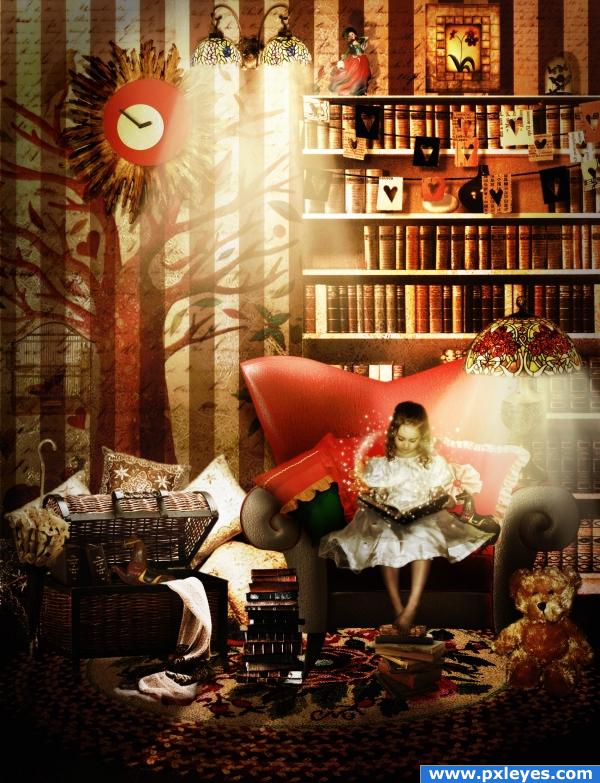
The minute I saw this image I just thought the chair would be perfect for reading...so I decided to create a magic atmosphere filled with books and vintage items!
I added girl and each item from different PNG files to create room atmosphere.
Added shadows individually for each item, colored overall and then added overall shadows.
Added backround texture, played with adjustment layers.
Extra Sources:
- Sun Mirror Frame - http://bluesse.deviantart.com/art/23-TRNSP-PNGS-MIRRORS-FRAMES-131582454;
- Teddy Bear - http://inspyretash-stock.deviantart.com/art/Teddy-Bear-2-70717297
- Bird Cage - http://bluesse.deviantart.com/art/27-TRNSP-PNGS-VINTAGE-OUTDOOR-123321745;
- Words Brush - http://spiritsighs-stock.deviantart.com/art/Words-15277456;
- Texture - http://sammykaye1sstamps.deviantart.com/art/Fungus-Texture-6-99140668;
- Pixie Dust and Glitter - http://redheadstock.deviantart.com/art/Glitter-Sparkles-Brushes-48646588;
- Light Beams - http://www.obsidiandawn.com/light-beams-photoshop-gimp-brushes.
Credits to:
- "Bluesse" on Deviantart for an amazing stock with lots and lots of PNG files, extremely useful. You can find author at: http://bluesse.deviantart.com/;
- "Darkmaiden" on Deviantart for the perfect little girl reading photo. Please visit author at: http://darkmaiden-stock.deviantart.com/;
- "Inspyretash" for a great teddy bear shot. Author's account at: http://inspyretash-stock.deviantart.com/;
- "Spiritsighs" for a great words brush. Please check a lot more other useful brushes at: http://spiritsighs-stock.deviantart.com/;
- "sammykaye1sstamps" on deviantart for a very nice texture, find other more useful stuff at: http://sammykaye1sstamps.deviantart.com/;
- Last but not least: "Redheadstock" also on Deviantart, for a great glitter brush, and many more at: http://redheadstock.deviantart.com/.
Hope you like it! SBS coming soon! (2 years and 255 days ago)
I felt like doing something different...something that I couldn't quite put my finger on myself....! Hope I succeeded! You tell me....lol!
Alien reconstruction entirely out of source image. From the female portrait used I kept only the face and built everything around it.
A lot of colouring process using gradient adjustment layers.
I would like to thank a lot for the extraordinary stock provided so kindly by "Katanaz" on Deviant art! You can find very good quality photos at: http://katanaz-stock.deviantart.com/.
I would also like to thank "Superior Stock" also on Deviantart for some amazing PNG files collections. Check it out and you won't regret it: http://superior-stock.deviantart.com/.
I have sent notes to both authors with link to this image. As proof you can see screenshots of the messages at the end of my SBS: step 32 and 33.
Deviantart is back on, might have been just my computer, so all sources work now.
Please follow SBS for a lot more details! Enjoy! (2 years and 314 days ago)
Ok....I have only one word to say about this....looooots of work...and lots of sources!
I have dreamed to create a steampunk image for a long time now...and I'm happy I got the chance to do it!
Hope you find it interesting for a first try!
First of all million thanks to Becky Stock on deviantart for the great man image, at http://b-e-c-k-y-stock.deviantart.com/.
Then credits to:
- "csnyder" at http://csnyder.deviantart.com/ for beautiful clouds images;
- "cepolina.com" for a great mask image at: http://www.cepolina.com/freephoto/;
- "strwberrystk" for the little key at: http://strwberrystk.deviantart.com/;
- "sunira"for a great great galaxies free brush at: http://sunira.deviantart.com/.
Please see also extra sources:
1. http://www.sxc.hu/photo/1137812 - Clock for backround
2. http://www.sxc.hu/photo/1067358 - Clock 1 on hat
3. http://www.sxc.hu/photo/1111976 - Clock 2 on hat
4. http://www.sxc.hu/photo/1080261 - Clock 3 on hat
5. http://www.sxc.hu/photo/1044042 - Rooster
6. http://www.morguefile.com/archive/display/5202 - black hat
7. http://www.sxc.hu/photo/452382 - wings on hat
8. http://www.sxc.hu/photo/950983 - Furnace
9. http://qbrushes.com/photoshop-abstract-brushes/smoke-brushes/ - smoke brush
10. http://sunira.deviantart.com/art/Nebulae-Brushes-18959502 - Galaxies Brush
Please see high resolution and also be kind and wait for SBS, will be posting it tomorrow as it has been a long day on photoshop for me...!
Hope you like it! (2 years and 294 days ago)
This is my entry for the contest on PST.
Even though I am usually very organized with my stuff on the computer...and keep most of it as well....I simply couldn't find the SBS or photoshop folders for it!
So I apologize for the short SBS.
Basically, I made the strange looking flying creature out of pieces selected from a crow and added them onto the deco girl. Then added backround trees, birds and fog and colored the entire image using gradient adjustment layers.
Hope you still like it!
Credits to:
- "bjearwicke" for tree silhouettes; official account at: http://www.sxc.hu/profile/bjearwicke and please check http://garrisonphoto.org/sxc/ as well;
- "wyckedbrush" on deviantart.com; http://wyckedbrush.deviantart.com/ for more wonderful brushes;
- "qbrush.com" and "cgtextures.com" for an endless source of inspiration and good images. (2 years and 197 days ago)
I got the image of a spring and selected it using the pen tool.
I put it over the flamingo in the source image after I made it bigger. I used the ctrl+Shift+I+ Del method to cut the flamingo into the spring shape. I played with the blending modes and opacities to get the spring to look more like the initial flamingo. I masked a lot using layer's masks.
Added leaves all around the image and sky in the backround. I added some gradient adjustment layers, brightness and contrast and shadows using different tones of grey.
Added some light beams and cropped the image for composition purposes.
SBS upcoming! (2 years and 305 days ago)
First of all I selected the hut by using the pen tool. It was quite a work to get rid of some backround that was still visible through some wood pieces.
I selected the moon out of a picture by using the quick selection tool and added onto my hut image. Found a good spot for the moon (top right side of the screen) and connected the hut to the moon by using a hook from one of my own images (please see SBS).
Added sky and clouds backround, trees, colored image using a lot of different gradient adjustment layers.
Added light beams from windows and some star dust using an excellent magic brush.
Credits to:
- "Lill-stock" for a perfect moon image. Please visit account at: http://lill-stock.deviantart.com/;
- "spiritsighs-stock" for a perfect fantasy brush. Main account at: http://spiritsighs-stock.deviantart.com/;
And "Stock.xchng", as usual the best site to find exactly what I'm looking for and "obsidiandawn" for a great light beam brush with endless usage!
Please see SBS for details.
I hope you like it! (2 years and 283 days ago)
go to Nellista's profile
O.o omg i love this
awesome entry Reply »
(2 years and 285 days ago)
A couple of the butterflies shouldn't be casting shadows on the air, otherwise not bad...
Reply »
Edit: Shadows corrected, good luck.
(2 years and 285 days ago)
Just Awesome
Reply »
(2 years and 285 days ago)
I KNOW I KNOW I KNOW... giggle snort ... I do believe the Brothers Grim and Hans Christian Anderson crashed into each other and started to burn with the fire of 10 million stars hehehehehe Reply »
(2 years and 285 days ago)
very pretty
Reply »
(2 years and 285 days ago)
Thank you very much for your comments! You're right CMYK46, I spotted one or two....I will correct asap! Thanks for the tip! Reply »
(2 years and 285 days ago)
Amazing... i'll hold my vote until the sbs comes up, but this is incredible..
Edit: Just as i though.. excellent step by step guide with a magnificent image... i'm still getting the shivers just looking at it. Reply »
(2 years and 285 days ago)
Huston, we have a winner ! (if SBS comes out)
Reply »
(2 years and 285 days ago)
great work! stands out of the rest!! Reply »
(2 years and 285 days ago)
wow I really love this, great work. Reply »
(2 years and 285 days ago)
Looks wonderful
Reply »
(2 years and 285 days ago)
oh wow, this design made the image looks softer. Reply »
(2 years and 285 days ago)
Most obliged for the wonderful comments! I made corrections suggested by CMYK46 and added SBS! Thank you! Reply »
(2 years and 285 days ago)
i love surreal . lovely balance of colours Reply »
(2 years and 285 days ago)
amazingly fantastico! this image is te very deffinition of warm! it has a very nice feel to it!! Reply »
(2 years and 285 days ago)
I like this!!!! Very well done Author! good Luck!!!!
Reply »
(2 years and 284 days ago)
very cute! Reply »
(2 years and 284 days ago)
really good! Reply »
(2 years and 284 days ago)
Stone the crows this is good Reply »
(2 years and 283 days ago)
cool Reply »
(2 years and 283 days ago)
Aaaah.... Ooooh.... (add 20 more ah and oh here) How lovely!
The whole mood is just perfect
Good luck! Reply »
(2 years and 283 days ago)
Awesome image, and my first favorite. Reply »
(2 years and 282 days ago)
apsolute winner... Sorry to the others... i just have to be real... Reply »
(2 years and 281 days ago)
stunning author
i love the softness of the image... and the colours, well done
Reply »
(2 years and 281 days ago)
very beautiful, great work Reply »
(2 years and 281 days ago)
great composition and very beautiful colors , i love the mood of this v much .. GL Reply »
(2 years and 281 days ago)
beautiful image, a well deserved 1st place. congrats. Reply »
(2 years and 279 days ago)
Congrats for your first place, Cornelia! Reply »
(2 years and 279 days ago)
Congratulations for 1st Reply »
(2 years and 279 days ago)
Congrats, a beautiful piece of work
Reply »
(2 years and 279 days ago)
Congrats!, just awesome work. Love it. Reply »
(2 years and 279 days ago)
Thank you all for the congrats and for the support and votes! I'm so delighted and happy! Reply »
(2 years and 279 days ago)
congrats Reply »
(2 years and 279 days ago)
Congrats!! Reply »
(2 years and 278 days ago)
Great work Reply »
(2 years and 275 days ago)