



Original image
step 1 of 12

step 2 of 12
Make new layer 7000/9000 pixels And cut this part from this photo
Kalmar castle 1018702_31240253 http://www.sxc.hu/browse.phtml?f=download&id=1018702
And add it for the layer you make it.
Kalmar castle 1018702_31240253 http://www.sxc.hu/browse.phtml?f=download&id=1018702
And add it for the layer you make it.

 sources used for this step:
- : source
step 3 of 12
Used the pen tool
To cut this from the mean photos on the contest.
Used the burn tool on the part you cut it.
1 -Make drop shadow /Blend mode overlay
Color 000000 /Opacity 100 % Distance 33 / Spread 0 / Size 5
2- Make gradient overlay by 2 colors
c3afa & ffffff Blend mode screen/ Opacity 50 / linear / Angle 90 Scale 100 %
To cut this from the mean photos on the contest.
Used the burn tool on the part you cut it.
1 -Make drop shadow /Blend mode overlay
Color 000000 /Opacity 100 % Distance 33 / Spread 0 / Size 5
2- Make gradient overlay by 2 colors
c3afa & ffffff Blend mode screen/ Opacity 50 / linear / Angle 90 Scale 100 %

step 4 of 12
Cut the boy from this photo The First steps 2 http://www.sxc.hu/browse.phtml?f=download&id=1252919
And used the burn tool on the part you cut it.
And used the burn tool on the part you cut it.
 sources used for this step:
- 1: source 1
step 5 of 12
Cut the tree from this photo ( Lone Tree )
http://www.sxc.hu/browse.phtml?f=view&id=344495
And used the burn tool on the tree you cut it
http://www.sxc.hu/browse.phtml?f=view&id=344495
And used the burn tool on the tree you cut it
 sources used for this step:
- 2: source 2
step 6 of 12
Cut the ode man from this photo Old Man in Park 16022_8583 http://www.sxc.hu/browse.phtml?f=download&id=16022
And used the burn tool on the old man you cut it
And used the burn tool on the old man you cut it
 sources used for this step:
- 3: source 3
step 7 of 12
Cut the man from this photo (Me, myself and again )
http://www.sxc.hu/browse.phtml?f=view&id=734189
And used the burn tool on the old man you cut it
http://www.sxc.hu/browse.phtml?f=view&id=734189
And used the burn tool on the old man you cut it
 sources used for this step:
- 4: source 4
step 8 of 12
Cut this part from the sky on this photo ( Sky )http://www.sxc.hu/browse.phtml?f=view&id=1254632
And put it in top of the first layer
And make it (linear light)
And put it in top of the first layer
And make it (linear light)
 sources used for this step:
- 5: source 5
step 9 of 12
Duplicate the last layer you make it and make it color burn

step 10 of 12
Cut the feet from this photo (Imprints )
http://www.sxc.hu/browse.phtml?f=view&id=1046097
And make it luminosity
http://www.sxc.hu/browse.phtml?f=view&id=1046097
And make it luminosity
 sources used for this step:
- 6: source 6
step 11 of 12
Duplicate the (feet) last layer you make it and make it luminosity

step 12 of 12
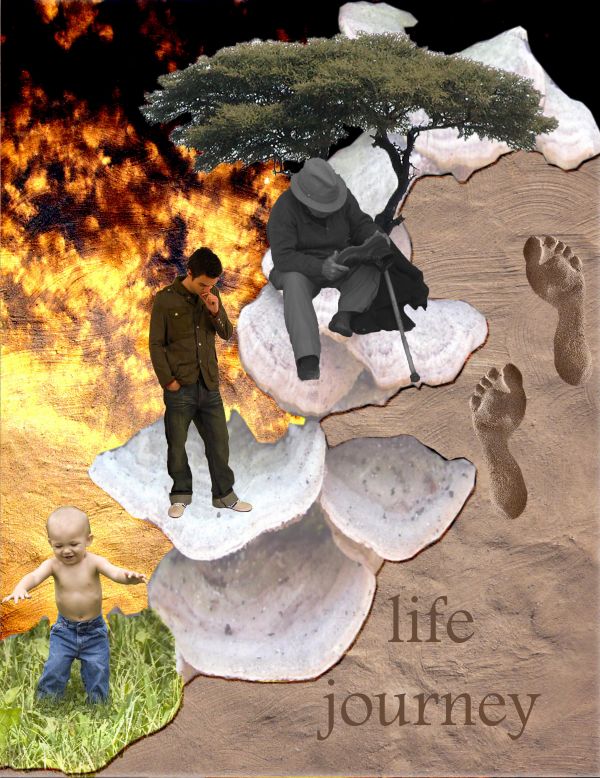
Write (life journey) and make it luminosity.

Final result
Pxleyes
Photography and photoshop contests
We are a community of people with
a passion for photography, graphics and art in general.
Every day new photoshop
and photography contests are posted to compete in. We also have one weekly drawing contest
and one weekly 3D contest!
Participation is 100% free!
Just
register and get
started!
Good luck!
Follow us:








© 2015 Pxleyes.com. All rights reserved.