



Original image
step 1 of 5
I cut out the sky and placed it behind the subway layer.
I then erased parts of the subway layer to reveal the sky layer behind.
I then erased parts of the subway layer to reveal the sky layer behind.

step 2 of 5
I cut out the watch face from the source image.
Then using the eyedropper tool I sampled colours from the underground sign (the red, blue and white)
I used a soft brush on a new layer over the parts I wanted coloured (see image for colour placement)
I then set the layer to overlay but this wasn't enough for the effect I wanted, so I duplicated the layer and set the new one to colour.
I then combined the layers by clicking on the top layer, then holding shift to select the botom layer and all inbetween.
then pressing ctrl-alt-shift-E (cmd-shift-optin-E on a mac)
I made a new layer that contained all of my selected layers as a copy, just incase I needed to go back and change anything at a later date.
Then using the eyedropper tool I sampled colours from the underground sign (the red, blue and white)
I used a soft brush on a new layer over the parts I wanted coloured (see image for colour placement)
I then set the layer to overlay but this wasn't enough for the effect I wanted, so I duplicated the layer and set the new one to colour.
I then combined the layers by clicking on the top layer, then holding shift to select the botom layer and all inbetween.
then pressing ctrl-alt-shift-E (cmd-shift-optin-E on a mac)
I made a new layer that contained all of my selected layers as a copy, just incase I needed to go back and change anything at a later date.

step 3 of 5
I moved my "watch" layer into my subway layer and converted it into a smart object.
Then using free transform I resized the image and placed it over the underground sign.
I changed the opacity to about 50% so I could correctly place it. Then I changed it perspective to closely match that of the sign, before pressing enter (return on the mac) and setting the opacity back to 100%
Then using free transform I resized the image and placed it over the underground sign.
I changed the opacity to about 50% so I could correctly place it. Then I changed it perspective to closely match that of the sign, before pressing enter (return on the mac) and setting the opacity back to 100%

step 4 of 5
I then cut out the emblem of the watch and used the same tecnique as with the watch face to colour it.

step 5 of 5
I then moved my emblem layer into my subway image, converted it into a smart object, resized it, moved it over to the wall and changed its perspective.
I then added a slight drop shadow as i wanted it to look like a small piece of artwork, like the ones that are scattered about in the underground.
I then used a levels adjustment layer.
Followed by a viberance layer.
I then added a slight drop shadow as i wanted it to look like a small piece of artwork, like the ones that are scattered about in the underground.
I then used a levels adjustment layer.
Followed by a viberance layer.

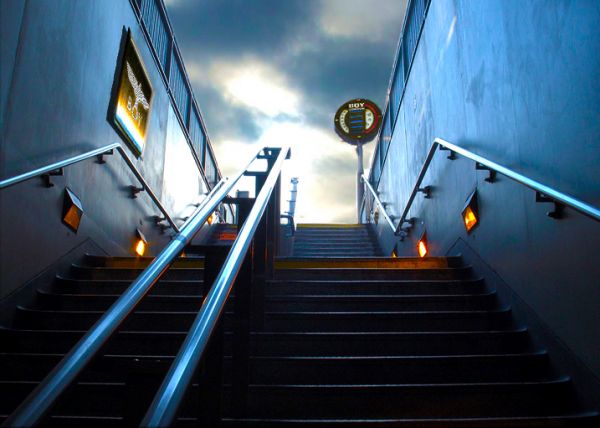
Final result
Comments
Pxleyes
Photography and photoshop contests
We are a community of people with
a passion for photography, graphics and art in general.
Every day new photoshop
and photography contests are posted to compete in. We also have one weekly drawing contest
and one weekly 3D contest!
Participation is 100% free!
Just
register and get
started!
Good luck!
Follow us:








© 2015 Pxleyes.com. All rights reserved.
I like it. Nice coloring.
(5 years and 3792 days ago)