



Original image
step 1 of 4
first I masked the face, than I copied the layer to a new one.
The second layer I reduced to black and white, copied the layer,
blurred it and saved the file for the displacement map.
the whole layers (original, B/W and the blurred)
came back in the later process as partical overlay,
multiply, and at the eye section as a hard-light mode with
a small opacity.
Than I masked a section from the Source image, corrected
the perspective and flipped them in all 3 left directions.
with this I made the rest of the pixel carpet.
I choose displacement and used the file I saved at the beginning.
I copied the blurred-face layer and put it on top with a overlay mode.
After that I cleaned some edges and colorized the
face
The second layer I reduced to black and white, copied the layer,
blurred it and saved the file for the displacement map.
the whole layers (original, B/W and the blurred)
came back in the later process as partical overlay,
multiply, and at the eye section as a hard-light mode with
a small opacity.
Than I masked a section from the Source image, corrected
the perspective and flipped them in all 3 left directions.
with this I made the rest of the pixel carpet.
I choose displacement and used the file I saved at the beginning.
I copied the blurred-face layer and put it on top with a overlay mode.
After that I cleaned some edges and colorized the
face

step 2 of 4
I masked the tree and then I played lumberjack.
I cut the tree in pieces, warped and liquified them
to make a new tree out of it.
I cut the tree in pieces, warped and liquified them
to make a new tree out of it.

step 3 of 4
to separate the light I copied the light at the horizontal (in the picture vertical)
line, flipped it horizontal and vertical and merged them together, and set
them to overlay. Problem, in front of anything that isn't black there
is still way too much blue, so I made a simple black box, merged the
overlay to the box, set that to overlay, Problem solved.
sounds simple, but that took me a while to solve. :-)
for the background I used a simple red blured dot.
line, flipped it horizontal and vertical and merged them together, and set
them to overlay. Problem, in front of anything that isn't black there
is still way too much blue, so I made a simple black box, merged the
overlay to the box, set that to overlay, Problem solved.
sounds simple, but that took me a while to solve. :-)
for the background I used a simple red blured dot.

step 4 of 4
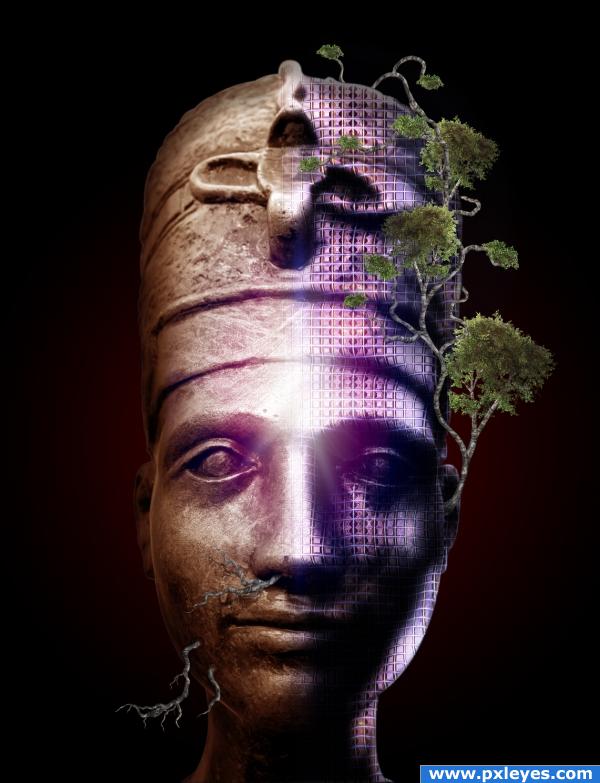
here it all comes together. The displacement, the overlays, the colour
the light, the tree. And the red dot as you can see in the final result.
the light, the tree. And the red dot as you can see in the final result.

Final result

Pxleyes
Photography and photoshop contests
We are a community of people with
a passion for photography, graphics and art in general.
Every day new photoshop
and photography contests are posted to compete in. We also have one weekly drawing contest
and one weekly 3D contest!
Participation is 100% free!
Just
register and get
started!
Good luck!
Follow us:








© 2015 Pxleyes.com. All rights reserved.