



Original image
step 1 of 13
Crop the image, mask out coaster.

step 2 of 13
Darken coaster with levels and curves.

step 3 of 13
Added stars with my stars brush.

step 4 of 13
Added clouds and outer glow.

step 5 of 13
Added shiny lights

step 6 of 13
Mask out the guy and created canines with liquify filter.

step 7 of 13
Chrome filter used to the guy

step 8 of 13
Filled eyes with white color and added blood cracks over them using brush and clipping mask.

step 9 of 13
Filled mouth with black on the new layer drew green dots, used inner and outer glow and swirl filter.

step 10 of 13
Drew elipse with selection tool, inverse selection and filled it with black.

step 11 of 13
Drew green grids applied blur filter, also created battery bars at the top, lower their opacity.

step 12 of 13
Added text (terminator from dafont.com) beveal and emboss, stroke layer effects.

step 13 of 13
Added reflection of the guy, changed blending to screen and opacity to 33%.
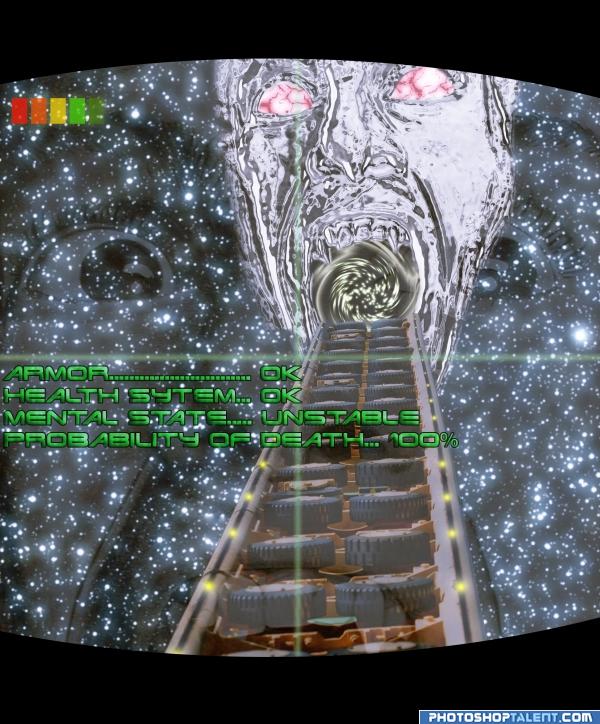
Final image has some contrast improvements.
Final image has some contrast improvements.

Final result
Pxleyes
Photography and photoshop contests
We are a community of people with
a passion for photography, graphics and art in general.
Every day new photoshop
and photography contests are posted to compete in. We also have one weekly drawing contest
and one weekly 3D contest!
Participation is 100% free!
Just
register and get
started!
Good luck!
Follow us:








© 2015 Pxleyes.com. All rights reserved.