



Original image
step 1 of 10
1. Rusty selection from the bolts image.
2. Using the warp tool, resize and flip, created the shape of a futuristic hat. Also burned it and added the sponge filter: brush size 4, definition 13, smoothness 7.
2. Using the warp tool, resize and flip, created the shape of a futuristic hat. Also burned it and added the sponge filter: brush size 4, definition 13, smoothness 7.

step 2 of 10

step 3 of 10
Initial round shape bolts image, selected with the pen tool.

step 4 of 10
Used the selection in step 3 to cover girl's face, neck and body. Warping, liquifying, resizing, burn tool and different blending modes for layers in order to get shadows and highlights.
Also added a light pinkish light over the shoulders as I had decided that the colour of the overall backround light should be pink.
Also added a light pinkish light over the shoulders as I had decided that the colour of the overall backround light should be pink.

 sources used for this step:
- 1: source 1
step 5 of 10
1. Initial selection
2. Warping, resizing, creating flowers bouquet.
3. Duplicating bouquet layer, changed blending mode to multiply, used burn and dodge tool for contrast and highlights.
2. Warping, resizing, creating flowers bouquet.
3. Duplicating bouquet layer, changed blending mode to multiply, used burn and dodge tool for contrast and highlights.

step 6 of 10

step 7 of 10
1. Initial selection of the chain in source image.
2. Chain clean up, using the pen tool on the interior parts and pressing delete for a more precise selection.
3. Warping, resizing, flipping horizontal in order to get more shapes and lenghts for all chains.
2. Chain clean up, using the pen tool on the interior parts and pressing delete for a more precise selection.
3. Warping, resizing, flipping horizontal in order to get more shapes and lenghts for all chains.

step 8 of 10
Added the chains, kept duplicating them and rotate them keeping the center in the same position at all times.
Also added the round bolts selection on top of her eye and darkened it using burn tool, and added more color to the lips (hue/saturation). Changed blending mode for lips to color dodge and lowered opacity down to 50%.
Also added the round bolts selection on top of her eye and darkened it using burn tool, and added more color to the lips (hue/saturation). Changed blending mode for lips to color dodge and lowered opacity down to 50%.
 sources used for this step:
- 3: source 3
step 9 of 10
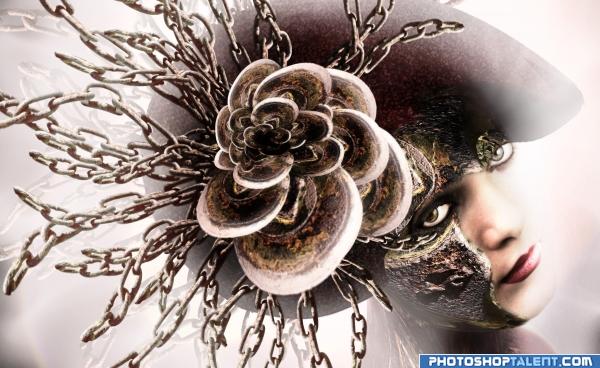
Added a pinkish backround and an awesome fantasy brush created by TreeHouseCharm on deviantart.
I used the brush all around the girl and masked unwanted areas. Left some really bright parts on the right side of the face to give it a more dreammy effect.
Made some of the backround chains a bit transparent and added gradients from the same light pink to transparent over different edges to create a smooth light transition between elements.
I used the brush all around the girl and masked unwanted areas. Left some really bright parts on the right side of the face to give it a more dreammy effect.
Made some of the backround chains a bit transparent and added gradients from the same light pink to transparent over different edges to create a smooth light transition between elements.

step 10 of 10

Final result

Pxleyes
Photography and photoshop contests
We are a community of people with
a passion for photography, graphics and art in general.
Every day new photoshop
and photography contests are posted to compete in. We also have one weekly drawing contest
and one weekly 3D contest!
Participation is 100% free!
Just
register and get
started!
Good luck!
Follow us:








© 2015 Pxleyes.com. All rights reserved.